


Hey, I’m Shubham Saboo, a Senior AI Product Manager at Google, creator of Awesome LLM Apps, a GitHub repository with 130,000+ stars, and Executive-in-Residence at Product Faculty – creator of the #1 AI Builder Fellowship, where you get access to 7 live cohorts (from AI Product Management to AI evals, Agentic Engineering, Nailing AI interviews, and so much more led by frontier AI operators from OpenAI, Anthropic, Google, and more for less than $10 a day.
Yes, really.
DeepSeek open-sourced its agent harness a few days ago, and it became the fastest GitHub repo to cross 100k stars, doing it in just 48 hours.
That made me curious what’s actually in it. So I installed it on my Mac and spent this weekend running it and reading the source.
You don’t need to switch to it to get the value. There are five design decisions in this codebase that really caught my attention. All of them are problems I’d came across before, just never seen handled well. I’ll walk through each with enough detail to use in whatever stack you’re on.
1. Derive the model’s context from a log instead of maintaining it
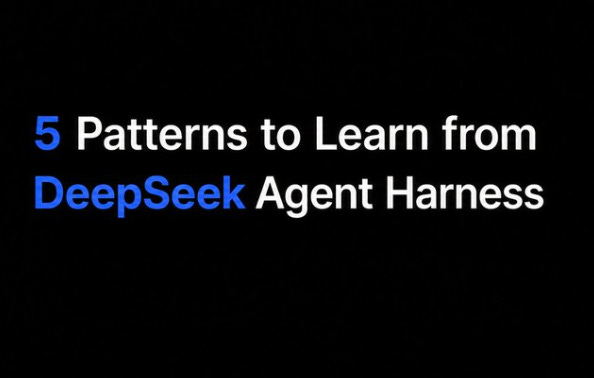
If you’ve built an agent, you’ve probably run into this: the context you sent to the model and what your logs say you sent don’t match, and now you’re debugging a bad run using a record of something that never happened.
This happens because the same information lives in two places. You have the messages array you send to the model, and you have the telemetry you emit about it, and nothing forces them to agree, so over time they don’t.
DeepSeek Harness only has one place. The session is an append-only event log, and the context for every model request gets recomputed from that log each time. They have a hard rule about it in the architecture docs: anything that reaches a model request has to be reconstructable from the log, and if you want to put something new in front of the model, you have to define a new event type for it first.
So there’s no way to sneak anything into the model’s view without it being recorded, because the record is literally where the view comes from.
There’s a check in the codebase that intercepts every outgoing LLM request and compares it field by field against a fresh derivation from the log. Messages, system prompt, tool schemas, temperature, all of it. If anything doesn’t match, it throws an error they named log-reconstruction desync.
Once you see this, their trace UI makes sense too. The trajectory panel shows you every call, every token count, every tool result, and it didn’t need any instrumentation to do that. It’s reading data that already had to exist for the system to work at all.
If you want this in your own stack, flip your write order: append the event first, build the request from what you appended, and add that equality check in dev. It’s maybe twenty lines, and it turns silent drift into a test failure you can actually see.
2. Loops get broken with reminders, not blocks
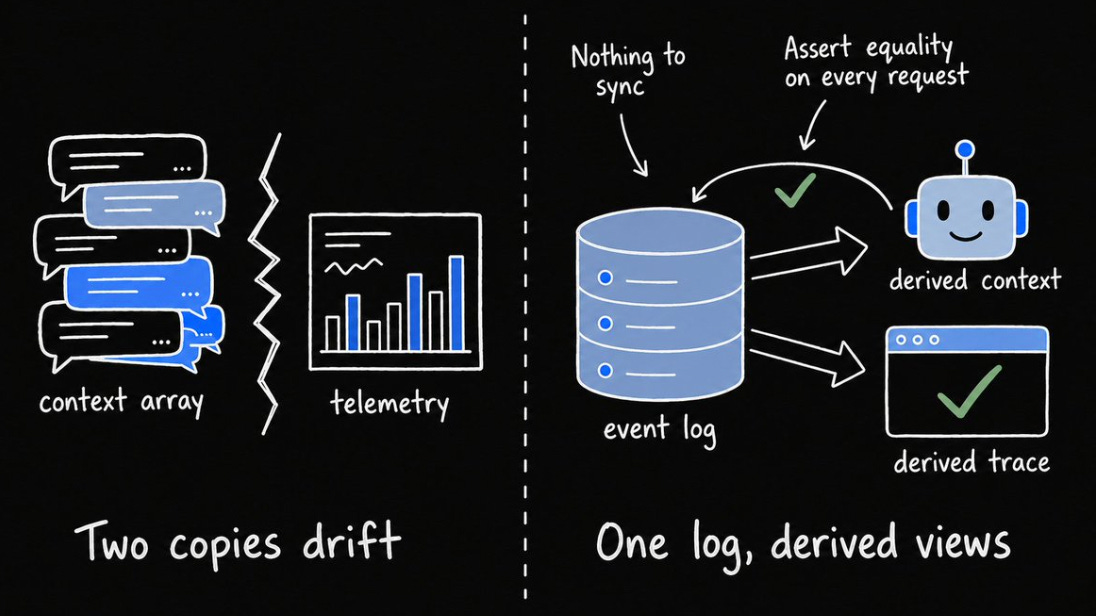
Everyone who runs agents has watched one get stuck calling the same tool with the same arguments over and over, burning tokens the whole time.
There are two common ways to deal with it and both are bad. If you hard-block repeated calls, you break the cases where retrying was legitimate. If you do nothing, the loop runs until the context fills up.
Their fix is a small plugin that counts consecutive calls to the same tool with identical arguments, and when the count hits 3, then 5, then 8, it injects an increasingly firm reminder into context: stop repeating yourself, re-read the last result, change approach or wrap up. It never blocks anything, so the model always keeps the final decision.
Same arguments in a different order still count as a repeat. A todo update between two identical greps doesn’t reset the count, because otherwise any small call in between would hide the loop. Denied calls count too, and an agent retrying a call that keeps getting rejected is the most common loop there is. And each agent gets its own counter, so a subagent stuck in a loop doesn’t set off warnings for the main agent.
You could build this in an afternoon in any harness that lets you watch tool calls. On Claude Code, hooks are enough.
3. Tell the model what it didn’t see
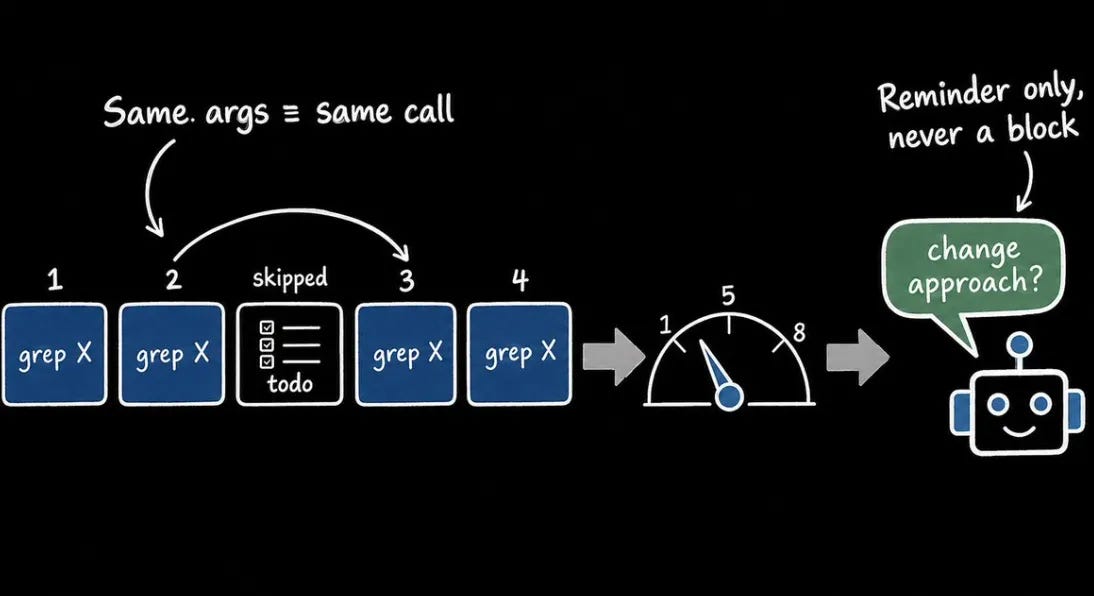
When your search tool returns the first 100 results out of 4,000 and doesn’t say it cut anything, your model now believes there are only 100 files. Every decision after that is built on a wrong number.
Their file search caps results too, but differently. When results go over the limit, it picks 100 spread across the whole project instead of the first 100, so the model gets a fair sample rather than whatever sorts to the top alphabetically. The result says it was cut. And the full list gets saved to a file, with the path included, so the model can go read the rest if it needs it.
When the sandbox blocks a command, their bash tool tells the model it’s “a policy denial, not a bug in the command; do not retry another way.” Without that line, the model would spend six turns trying to route around a rule you wrote on purpose.
Take an hour and audit your own tools against this. Does each one disclose when it cut something. Can the model reach what got cut. Does your error message make clear whether retrying will help.
4. Code execution that can’t dodge your permission layer
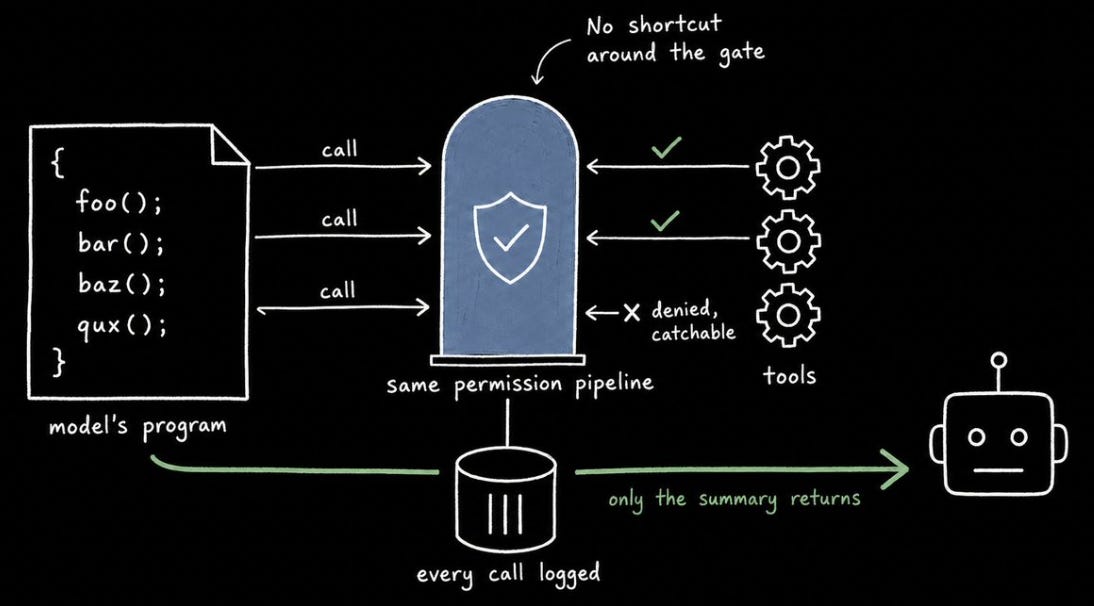
There’s a pattern everyone’s converging on right now: instead of making one tool call per turn, the model writes a program that calls your tools in a loop. Fifty file reads become one round trip, and only the summary the program returns ends up in context.
Code mode is their version of this. The model gets a single tool called run_code, and every other tool becomes a function it can call inside the program.
Every call the program makes still goes through the full permission pipeline, nothing gets a shortcut. Every call is logged individually, so you can see what the program did even though the model only saw one result. And a denied call shows up inside the program as a catchable error, not a hang or a silent null.
If you’re building this yourself, or evaluating a framework that claims it, check the permission part first. Skip it and the model has a working route around your own rules.
5. Kill the context, keep the workspace
Long-running agents pile up context until the context itself becomes the problem. At some point you have to start fresh and hope your notes were good enough.
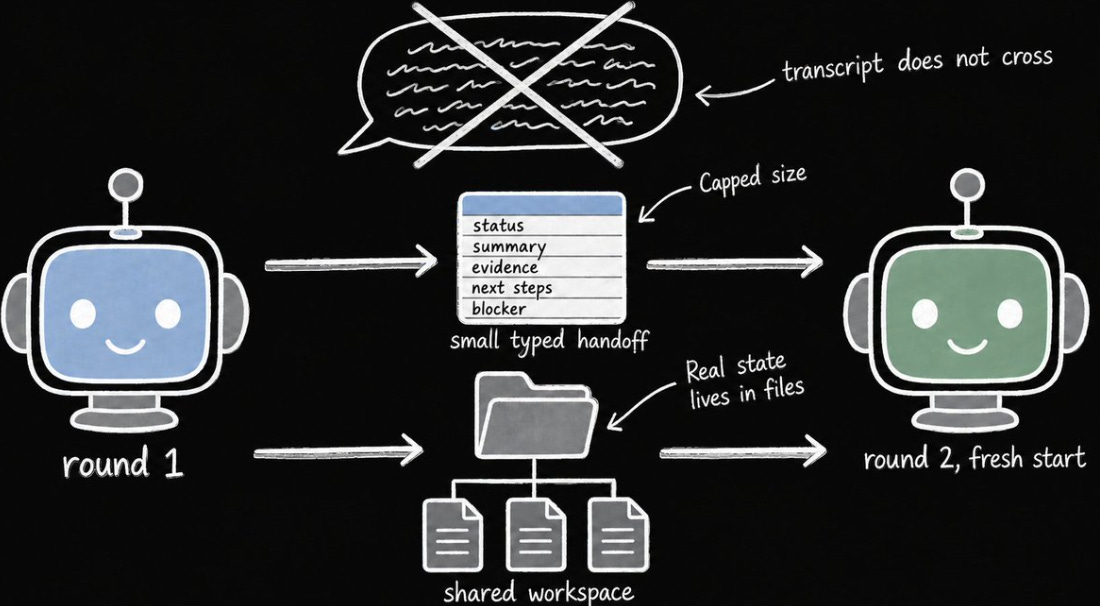
DeepSeek Harness built that restart into the system. Their restart loop works toward a fixed objective in rounds, and each round starts a brand-new agent with zero conversation history.
Between rounds, the new agent gets the files in the shared workspace and a small handoff with five fields: status, summary, evidence, next steps, blocker. The transcript doesn’t cross over, so every round starts at full reasoning capacity instead of wading through the last round’s leftovers.
I also liked the rules around quitting. The agent can’t declare itself blocked until it has tried at least three rounds, and only a human can create or change the objective, so a subagent can’t invent its own goals.
If you run overnight agents, write your handoff schema before you need it, cap its size, and decide which state lives in files and which dies with the context. Then a restart is just part of how the system runs.
Go verify it yourself
Everything I described is checkable in about fifteen minutes:
shell
npx @deepseek-ai/dsh web
Give it a task in a repo you know, then open the Trajectory tab and read through the run. You’ll see every request, every tool call, token counts, and time-to-first-token separated from decode time. You can also export any session as a zip and read the raw event log yourself.
If you want to test the plugin part directly, open ~/.dsh/profiles/web/cordis.patch.yml, add three lines disabling the row with id ui-sidebar, and reload. The sidebar disappears. Delete the lines and it comes back. Even the UI is rows in a config file.
And if you want to go deeper than my five picks, look at the source code on GitHub.
Start with the one that solves a problem you already have.
I’ll be publishing more about shipping agents in production, loops, agent harness and the patterns that scale. Follow me @ Saboo_Shubham_ to stay tuned.
🌟Check out the Awesome LLM Apps with 133k+ stars for free Agent skills and production agent templates: GitHub Repo